Back

The "Customer Alumni" Play

Watch a video
image
Use 2 fingers to drag, zoom in and out
Categories
Outbound
Signals
AI RevOps

Test test

Thank you, you should see the file in your downloads! You can follow us on our other channels on the right
Oops! Something went wrong while submitting the form.
by clicking download you subscribe to our marketing communications

Description

A workflow that turns former employees of your customers into outbound opportunities.

Read moreWatch video on youtube

How it works

mindmap
Loading mindmap...
Watch a video
Scroll to zoom in and out, drag to navigate

The "Customer Alumni" Play

Every company has a list of past buyers, people who believed in your product, saw value, and helped close deals. Then they changed jobs.

And that’s usually where the trail ends. Most teams never follow them, never track their movements, and never reconnect.

That’s a huge missed opportunity because those alumni are the warmest leads in your entire CRM.

They already understand what you do, how you help, and why you’re worth buying. When they join a new company, they bring that knowledge and often the influence to recommend the same tools they trusted before.

Unlike cold outbound, alumni outreach doesn’t start from zero. You’re not introducing yourself or convincing someone to care. You’re reconnecting with someone who’s already convinced, they just have a new email address, a new team, and a new budget.

That’s why customer alumni campaigns consistently outperform traditional outbound. They convert faster, require fewer touchpoints, and open the door to larger opportunities.

At Workflows.io, we’ve seen this play generate some of the highest-performing campaigns we’ve ever built. It’s a rare outbound motion that combines warm intent, perfect timing, and real automation.

This playbook breaks down the exact workflow we use to make it happen, step by step. You’ll learn how to:

- Identify customer alumni automatically

- Qualify their new companies against your ICP

- Tier them based on fit and potential

- Trigger the right outreach sequence automatically

Why the Customer Alumni Signal Works

Customer alumni campaigns work for one simple reason, they’re built on trust and timing. Two things that most outbound teams can’t fake.

When someone has already used your product and seen the results firsthand, you’re not starting a new conversation, you’re continuing an old one. And when that person moves to a new company, it creates the perfect window: new role, new decisions, new budgets.

That combination makes alumni outreach one of the most reliable outbound signals you can run.

Here’s why it performs so well:

- Built-in trust: They’ve already experienced your product, so there’s no credibility gap to close.

- Internal influence: They can advocate internally with confidence, often becoming the “champion” instantly.

- Perfect timing: Job changes usually align with fresh budget cycles, new tool evaluations, and the urge to make quick wins.

- Low friction: You don’t need to re-sell the problem, you just show how your product fits their new context.

Across campaigns we’ve run, alumni-triggered outreach consistently delivers 3–5x higher reply rates and noticeably shorter sales cycles compared to standard cold outbound.

How the Workflow Runs

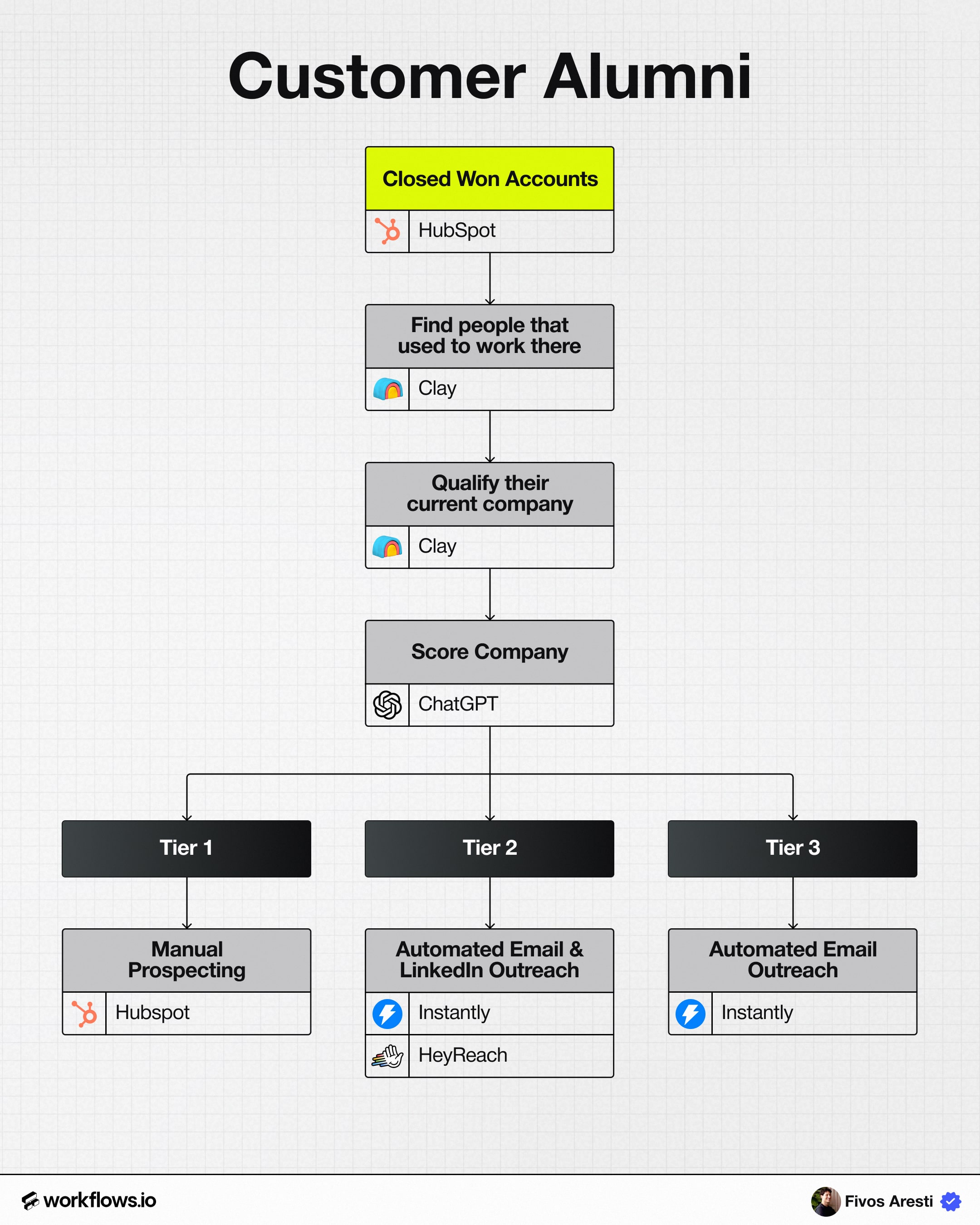
Step 1: Pull Closed-Won Accounts from HubSpot

Every Customer Alumni workflow starts with your CRM, it’s the single source of truth for verified buyers who have already gone through your full sales cycle.

Begin by exporting all closed-won deals from the past 12–24 months.

This timeframe ensures you’re capturing accounts recent enough that the product experience is still relevant, but broad enough to include people who may have since moved roles.

When you export, include:

- Company name to anchor enrichment later in Clay.

- Company domain for matching and enrichment accuracy.

- Deal value (ARR/ACV) useful for prioritizing high-value alumni later.

- Primary buyer contacts, ideally everyone involved in the deal: champions, decision-makers, and key users.

Once exported, combine these contacts into what we call your Alumni Seed List, a single, centralized list of everyone who’s ever bought, implemented, or advocated for your product.

This list is your hidden goldmine.

Each contact on it already understands your value proposition, has seen your product deliver results, and carries that experience and often influence into their next company.

Before moving forward, it’s worth doing a quick cleanup pass to:

- Remove bounced or inactive emails.

- Verify current LinkedIn profiles.

- Tag contacts by role (e.g., champion, decision-maker, user) to improve segmentation later.

Step 2: Find People Who Used to Work There (via Clay)

Once your Alumni Seed List is ready, the next step is to identify where those people are now.

This is where Clay becomes the engine that turns static CRM data into live outbound signals.

Using Clay’s “Find People Who Worked at [Company]” function, you can instantly locate individuals who previously worked at your closed-won accounts, your former champions, users, and stakeholders.

Here’s what Clay automatically pulls for each match:

- Past employer: One of your closed-won accounts.

- Current company and title: Where they’ve moved and what they do now.

- LinkedIn URL: For enrichment and messaging personalization.

- Movement recency: How recently they switched roles (critical for timing outreach).

These data points allow you to spot patterns quickly like multiple alumni joining the same new company and prioritize accordingly.

You can also filter results by:

- Recency (e.g., past 90–180 days) to catch job changers while they’re still in onboarding mode.

- Seniority or department (e.g., operations, marketing, sales) to stay focused on high-fit personas.

Once Clay has surfaced these people, you now have a dynamic, alumni signal list, a living dataset of trusted users who’ve just entered new environments where your product could add immediate value.

This list becomes the trigger layer for automation and scoring in the next step.

Step 3: Qualify Their New Company

Just because someone used your product before doesn’t mean their new company is a good fit.

This is where qualification comes in, ensuring you focus only on high-potential accounts that actually match your ICP.

Start by enriching each alumni’s new company using Clay and LLM-assisted research.

The goal is to automatically collect the data points that define fit, such as:

- Industry and sub-industry to confirm relevance and use-case alignment.

- Headcount and revenue range to ensure company scale fits your sales motion.

- Funding data useful for spotting growth-stage companies with active budgets.

- Tech stack and integrations to check for compatibility or competitor usage.

- ICP match score, an AI-generated summary that ranks fit based on your defined Tier 1–3 model.

Once enrichment is complete, filter the list to focus on companies that score as Tier 1 or Tier 2.

You can deprioritize or remove accounts that don’t meet baseline criteria, for example, if they’re in the wrong industry, lack budget signals, or use conflicting tools.

This qualification step is where efficiency compounds.

Instead of chasing every alumni move, you’re only engaging where the person and the company both align, high-trust contact, high-fit account.

That’s the intersection where alumni outreach consistently delivers outsized results.

Step 4: Score Companies with ChatGPT

Once enrichment is complete, it’s time to turn all that raw company data into a ranked, prioritized target list.

To do that, feed the enriched dataset into ChatGPT (or Claude) with a structured prompt that evaluates each company against your ICP framework.

The AI should assess every account and return:

- A fit score: Tier 1, Tier 2, or Tier 3, based on alignment with your ICP.

- A reasoning summary: A 1–2 sentence explanation outlining why it received that score.

- Negative signals: Notes like “uses direct competitor,” “service business,” or “outside ICP vertical.”

Once processed, you’ll have a clean, ranked list of alumni-driven accounts, sorted by ICP strength.

That score becomes the foundation for your routing logic, deciding which accounts go to manual outreach and which move into automated sequences.

Step 5: Route to Tiered Outreach

Once every company is scored, the next step is to route them to the right outreach motion based on their ICP tier.

This ensures your team’s effort matches the account’s potential, high-fit companies get human attention, while lower-fit accounts are handled efficiently with automation.

Here’s how we structure it:

In HubSpot, routing is automated using workflows.

When a contact is scored as Tier 1, the system assigns a task to an AE or SDR for personal follow-up.

Tiers 2 and 3 are synced to pre-built Instantly and HeyReach sequences, so they enter the correct cadence automatically.

This setup creates balance:

- Tier 1s get the thoughtful, human-first outreach they deserve.

- Tier 2s are efficiently scaled with light personalization.

- Tier 3s stay in your orbit through nurture sequences, without wasting manual time.

By matching effort to opportunity, your alumni play stays lean, automated, and high-performing, every rep working only where it matters most.

4. Why This Workflow Wins

Once this workflow is live, it becomes a self-refreshing outbound engine constantly identifying, qualifying, and re-engaging warm prospects without any manual work.

What makes it so effective is that it turns natural buyer movement into a predictable revenue signal.

Every time a champion changes jobs, the system automatically recognizes it, evaluates fit, and routes them to the right outreach sequence, all within hours, not weeks.

Here’s why this workflow consistently outperforms other outbound plays:

- Always-on intent signal:

Job changes happen every day. Your alumni list updates automatically, ensuring you never miss a high-trust lead the moment they join a new company.

- High intent, low noise:

These are not cold prospects, they already know your value and often have decision-making influence. Outreach feels relevant, not random.

- Shorter sales cycles:

You’re not starting from zero. There’s no need to rebuild trust or re-explain the product, conversations move faster and deals close sooner.

- Fully automatable:

Every part of the process, from contact detection to enrichment, scoring, and routing, runs hands-free once it’s set up.

Teams running this workflow typically see a 15–30% increase in qualified pipeline within a quarter without adding headcount, tools, or budget.

It’s one of the rare outbound plays that scales naturally because it’s powered by data you already own.

Conclusion

Customer Alumni outreach isn’t just another outbound play, it’s the highest-trust, lowest-friction growth channel most teams ignore.

Instead of starting from scratch every quarter, this workflow helps you stay connected with the people who already believe in your product, people who’ve moved on to new companies, new budgets, and new opportunities to buy.

When automated, it becomes a quiet growth engine that compounds over time, continuously turning past wins into future pipeline.

At Workflows.io, we help GTM teams deploy this system end-to-end, connecting HubSpot, Clay, and AI scoring to make alumni engagement effortless and always-on.

Because your next best customer probably isn’t a stranger.

It’s someone who’s already said “yes”, just at a new logo.