Back

The Social Listening Playbook

Watch a video
image
Use 2 fingers to drag, zoom in and out
Categories
Outbound
Signals
AI RevOps

Thank you, you should see the file in your downloads! You can follow us on our other channels on the right
Oops! Something went wrong while submitting the form.
by clicking download you subscribe to our marketing communications

Description

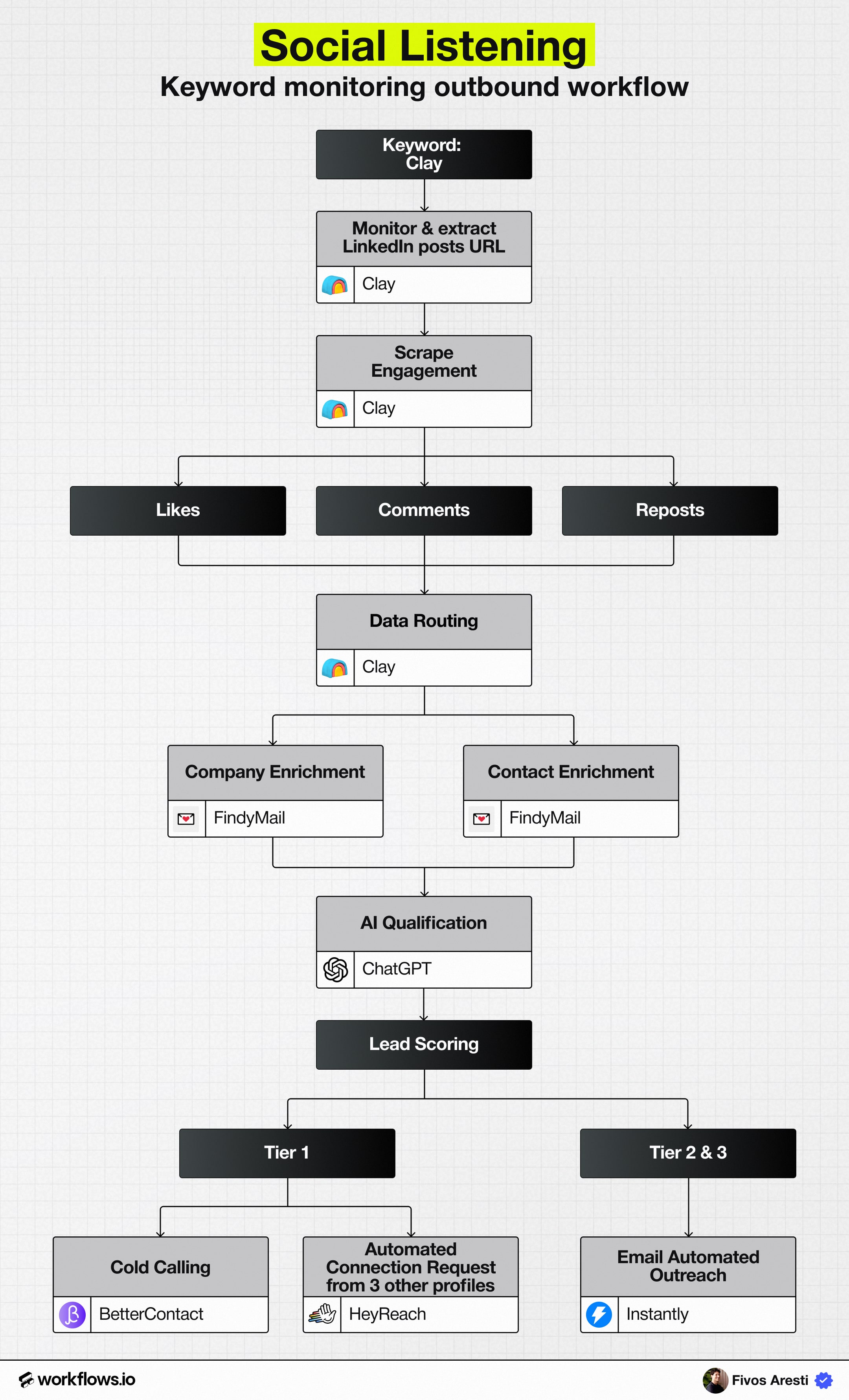
A fully automated workflow that turns LinkedIn keyword engagements into high-intent outbound pipeline using RB2B, Clay, and AI scoring.

Read moreWatch video on youtube

How it works

image
Watch a video
Scroll to zoom in and out, drag to navigate

The Social Listening Playbook

Most outbound starts cold, generic lists, static firmographics, and timing that’s more guess than strategy.

Meanwhile, your ideal buyers are already out there, publicly engaging with posts, topics, and tools that signal real intent.

They’re liking competitor content.

Commenting on relevant industry discussions.

Reposting conversations about the exact pain your product solves.

That’s not noise, it’s a live buying signal.

Social listening turns those engagements into outbound opportunities by tracking who’s talking about topics that matter to your business, qualifying them automatically, and routing them into tailored outreach sequences.

It’s the difference between sending another cold email and starting a conversation with someone who’s already thinking about your space.

At Workflows.io, we’ve built a fully automated version of this workflow, one that continuously monitors LinkedIn for specific keywords, enriches every engaged profile, scores them by ICP fit, and routes them to the right outbound sequence without manual effort.

This playbook breaks down how that system works, step by step.

Why the Social Listening Signal Works

Social listening is one of the most powerful outbound signals because it captures intent in motion, people already showing interest through their actions, not forms or clicks.

Traditional outbound relies on static data: company size, industry, title. But those details don’t tell you who’s actually paying attention right now. Social listening flips that dynamic.

When someone likes, comments on, or reposts content around your core topics or competitors, they’re signaling three things you can’t get from a database:

- Relevance: They’re engaging with content directly tied to your problem space.

- Recency: Engagement happened today, not six months ago.

- Context: You know what they care about based on the post itself.

That combination creates a perfect timing window.

Instead of guessing when to reach out, you’re starting from a live conversation that’s already happening.

Instead of pushing generic messaging, you can reference the exact topic they just interacted with.

It’s outbound that doesn’t feel cold, because it isn’t.

In our tests, social-listening-based outreach consistently delivers:

- 3–6x higher reply rates than list-based outbound

- Shorter ramp times for SDRs since messaging is contextual

- Higher conversion quality, with leads that are genuinely problem-aware

How the Workflow Runs

Step 1: Monitor LinkedIn posts with specific keywords

Every strong social listening workflow starts with the right keywords, the topics and tools that your ICP actively engages with.

Think of these as the “listening posts” where your potential buyers reveal what they care about.

Start by defining 5–10 core keywords.

These might include:

- Your own product or category (e.g. “Workflows.io”, “workflow automation”)

- Competitor names (e.g. “Clay”, “Apollo”, “HubSpot sequences”)

- Industry pain points (“go-to-market ops”, “sales automation”, “data enrichment”)

Step 2: Capture Engagement Data with RB2B

Once your target keywords are defined and Clay begins monitoring LinkedIn for relevant posts, the next step is to track who’s actually engaging with those posts.

This is where RB2B comes in.

RB2B continuously monitors LinkedIn for engagement activity around your chosen topics, likes, comments, and reposts and identifies the people interacting with those posts.

Each engagement is captured along with:

- The person’s name and LinkedIn URL

- The post they engaged with (including post link and author)

- Engagement type (like, comment, repost)

- Timestamp (when the engagement occurred)

That data is automatically sent into Clay via integration or webhook, where it’s organized into a clean, structured table for further enrichment.

The combination of RB2B’s engagement tracking and Clay’s data management creates a live stream of potential buyers, people showing intent right now, based on real actions on LinkedIn.

Step 3: Route Engagement Data into Clay

Once RB2B has identified who’s engaging with posts that match your keywords, the next step is to organize and centralize that engagement data inside Clay.

Think of Clay as your control center, the place where raw engagement activity turns into structured, usable prospect data.

Using Clay’s integrations or webhooks, the data from RB2B automatically populates a dedicated table.

Each row represents one individual and includes fields such as:

- Name and LinkedIn URL

- Engagement type (like, comment, or repost)

- Source post keyword (what topic triggered their engagement)

- Post URL and author name

- Engagement date and timestamp

- Post-level engagement context (e.g., “Commented on a post mentioning Clay”)

Once inside Clay, you can filter, sort, and segment the dataset in powerful ways, for example:

- Filter for commenters only (since they tend to show higher intent)

- Prioritize engagements within the last 14 days

- Focus on specific keywords or competitor mentions that indicate strong interest

This step is where data begins to take shape.

Step 4: Enrich Company and Contact Details

Engagement alone doesn’t equal opportunity, enrichment turns anonymous signals into actionable leads.

Using Clay’s enrichment workflows and Findymail, you can automatically append both company-level and contact-level details for every engaged user.

Here’s how it breaks down:

1. Company enrichment

Clay’s built-in enrichment agents pull detailed company data for each contact’s current employer.

This includes:

- Company name and domain

- Industry and sub-industry

- Headcount and revenue range

- Funding stage and investors

- Location and region

- Tech stack (via BuiltWith integration)

- Hiring velocity and growth signals

These attributes give you visibility into who’s actually behind the engagement, whether it’s a 15-person startup, a mid-market SaaS, or an enterprise organization expanding its tech stack.

2. Contact enrichment

Next, use Findymail to enrich verified contact information for each person who engaged.

Findymail specializes in high-accuracy email discovery, ensuring that every outreach-ready record includes:

- Full name

- Job title and seniority

- Verified work email

- LinkedIn profile

This step converts engagement into pipeline, every “like” or “comment” now represents a reachable prospect in your ideal market.

Step 5: AI Qualification with ChatGPT

With all engagement data enriched, the next step is to separate high-value prospects from casual engagers. Instead of manual review, use ChatGPT (or Claude) to automatically score each contact based on ICP fit and intent.

How it works

Inside Clay, use the AI Research Agent block to feed each contact’s enriched data (company info, role, and engagement context) into ChatGPT.

Prompt the model to output:

- Fit score: Tier 1 / Tier 2 / Tier 3

- Confidence level: High / Medium / Low

- Reasoning: 1–2 lines explaining the decision

- Negative flags: Optional disqualifiers (e.g., “non-SaaS,” “competitor user”)

This converts engagement data into a prioritized lead list, structured, explained, and ready for outreach.

Tier outcome

Tier Meaning Action
Tier 1 Strong ICP + clear intent Manual or high-touch outreach
Tier 2 Moderate ICP fit Automated multichannel sequence
Tier 3 Low fit or low intent Exclude or nurture only

Once scoring is complete, Clay automatically syncs tiers and reasoning back to HubSpot, so your team knows who to prioritize and why.

Step 6: Route to Tiered Outreach Sequence

Once every engaged contact is scored and classified, it’s time to activate outreach automatically, and at the right level of effort for each tier.

Clay pushes the scored leads into HubSpot, where automation routes them to the correct outbound sequence via Instantly and HeyReach.

The result: every social signal turns into a live outbound motion without manual sorting or guesswork.

Tier routing logic

Tier Outreach Type Tools & Channels Example Actions
Tier 1 Manual or semi-manual HubSpot → AE Tasks AE notified in Slack/HubSpot → Personalized LinkedIn + email sequence
Tier 2 Automated, multichannel Instantly + HeyReach Enrolled in tailored sequence: short intro email + LinkedIn follow-up
Tier 3 Automated email only Instantly Nurture-style drips or low-effort awareness touchpoints

Why This Workflow Wins

The Social Listening workflow works because it taps into real-time intent, people already engaging with the exact problems your product solves.

Unlike cold lists or static databases, this system continuously surfaces prospects who are actively participating in relevant conversations.

Once automated, it becomes a live intent engine that feeds your outbound motion daily.

Here’s why it consistently outperforms cold outbound:

- Signal-based, not guess-based: You’re targeting people who already show interest in your space.

- Always-on and dynamic: RB2B tracks new engagement as it happens, refreshing your lead flow in real time.

- AI-qualified and filtered: ChatGPT ensures only ICP-fit prospects make it into outreach.

- Right-effort routing: Tiered sequencing ensures high-fit contacts get personal touches while others scale automatically.

- End-to-end automation: From signal → enrichment → scoring → outreach, no manual steps, no data loss.

Teams running this play often see 3–6× higher reply rates and significant lift in SQL volume with zero additional SDR headcount.

Conclusion

Social Listening is how outbound finally meets intent.

Instead of guessing who might care, you’re reaching people who already show they care, through real, public signals.

When combined with Clay, RB2B, and AI qualification, this becomes a self-updating outbound engine that identifies, prioritizes, and activates new opportunities every single week.

At Workflows.io, we help GTM teams deploy this exact system, connecting social signals, enrichment, and outreach into one seamless workflow.

If your outbound still starts cold, this is how you make it warm, automatically.