

Knowledge dies in three places:
- Slack threads that scroll out of reach after a week.
- Notion pages that haven't been updated in six months.
- People's heads, walking out the door whenever someone leaves.
You've probably watched this happen at your last company.
Decent documentation, SOPs in Notion, loom videos for every tool, onboarding checklists but new hires still take six weeks to fully ramp, asking questions that were answered two years ago in some thread no one can find.
The problem is where the docs live. Every system you're using is good at storing information for a person to read later, and bad at making that information available the moment someone (or something) needs it.
Then Claude Code happened. And the whole picture changed.
When Claude Code can read from a structured set of files, your documentation stops being a static archive. It becomes context that Claude pulls into every session. SOPs become skills. Playbooks become agents. Past campaigns become reference data. The thing you've been calling "documentation" is actually the operating system for your company.
We moved everything to GitHub. We've been running it for a few months now. This post is a walkthrough of what's inside the repo, why it's structured the way it is, and what changes once it's running.
What we mean by "Company OS"
A Company OS is a single source of truth for everything your team knows. A structured set of markdown files, organised by purpose, version-controlled in Git, and connected to Claude Code through the file system.
Three things have to be true for this to work:
- It has to be readable by Claude. Markdown, plain text, no proprietary formats.
- It has to be easy to search. Folder structure matters. File names matter.
- It has to update. A static repo is just documentation. A living repo is infrastructure.
Company OS projects fail when they get treated as a one-time documentation push. They succeed when they get treated as infrastructure that grows over time.
Let's get into what's actually inside the repo.
The folder structure
Here's how our Company OS is organised. Six top-level folders, each with a specific job.
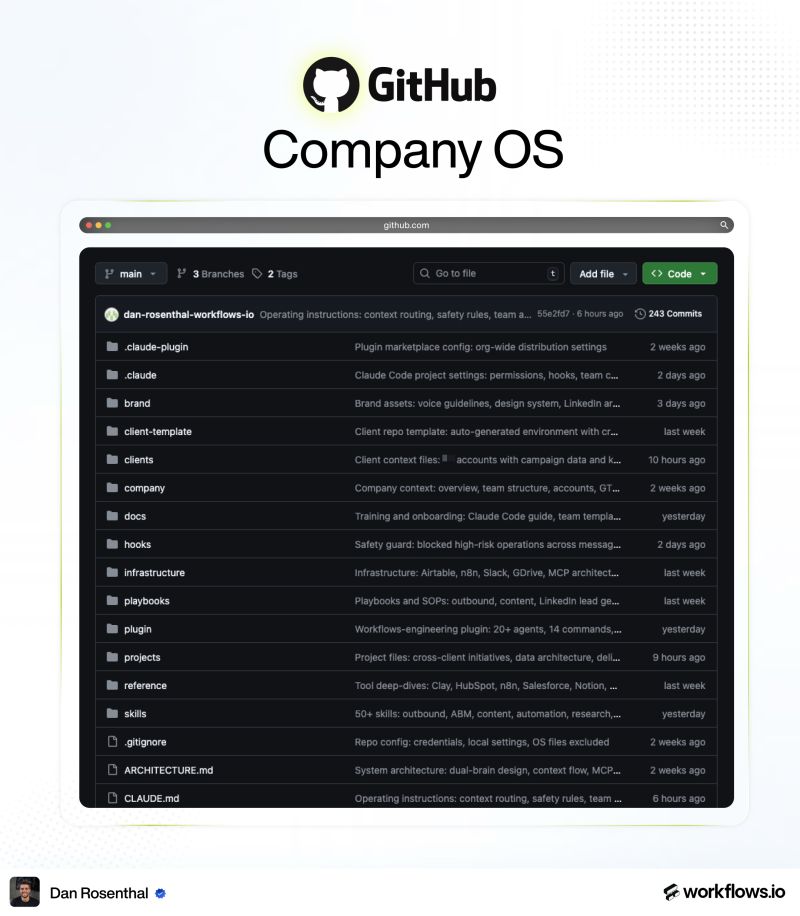
company/
This is everything that makes us us. The team page (who works here, what they do, how to reach them). The voice guide (how we write, what we sound like, words we don't use). The design system (logos, colors, components). And industry intel (the GTM space, what's changing, what we believe).
When Claude is writing a LinkedIn post, it pulls from voice/. When it's making a deck, it pulls from design/. When someone new joins, they read company/ before anything else.
wiki/
This is where our SOPs and playbooks live. How we run a discovery call. How we onboard a new client. How we set up an Instantly campaign. How we score an inbound lead.
The trick we figured out late: SOPs shouldn't stay as text. They should be turned into Claude skills. A skill is a markdown file with instructions Claude follows when triggered. Once you've turned an SOP into a skill, the SOP runs itself. Claude reads it, executes the steps, and reports back.
About 70% of our SOPs are now skills. The rest are still text because they involve human judgement that's hard to script.
clients/
Every client we work with gets a folder. Inside: their ICP, voice guide, brand assets, historical campaigns, onboarding form data, and any deep research we've done on their market.
The real value is the auto-synced data. n8n pulls in their Slack threads, call transcripts, and Google Drive changes every few hours. So whenever anyone on the team starts a Claude session for a client, the context is already current. Nobody has to brief Claude. The folder briefs Claude.
raw/
This is the dumping ground. Client call transcripts. Market research. Competitor scrapes. Stuff we haven't structured yet but want Claude to be able to reference.
The point of raw/ is that not everything has to be polished to be useful. Sometimes you just need Claude to be able to grep through every call transcript from the last six months and pull every mention of "deliverability problems."
plugin/
This is where our agents, commands, and hooks live. We've got 26 agents, 23 commands, and a handful of hooks that gate the riskier operations.
An agent is a specialist version of Claude that's good at one thing. Our outbound-copywriter agent is tuned for cold email. Our content-planner agent only thinks about LinkedIn. Each one has its own context, its own instructions, and its own permissions.
Hooks are the safety layer. They gate things like deleting CRM data, sending emails, or pushing changes to production. Around 94 operations are gated. Nothing irreversible runs without a human in the loop.
skills/
This is the biggest folder. Right now we have 79 Claude skills.
A skill is a markdown file that tells Claude exactly how to do one task. We have skills for ICP modelling, LinkedIn post drafting, discovery call prep, sequence building, deliverability auditing, and dozens of others. Anyone on the team can write a new one in an afternoon. They get propagated across the org through GitHub.
Skills are the workhorse. The daily work that used to live in someone's head now lives in skills/.
The per-client repo
Each client also gets their own private repo. Same pattern as the Company OS, just personalised to their account.
What's inside:
- Their ICP, voice guide, and brand assets.
- Historical campaigns and what worked.
- Onboarding form data and any deep research we've done.
- Auto-synced Slack threads, call transcripts, and Google Drive changes.
- API and MCP connections to their revenue stack (HubSpot, Apollo, Instantly, HeyReach, and so on).
The result: every team member has full client context and full company context in every Claude session. No briefings. No context handoffs. The repo handles it.
This is the half of the system that's easy to skip. The Company OS works fine without per-client repos for a while. Then you add your third client, and Claude starts mixing up voice guides between accounts. The per-client repo solves that.
What MCPs add to all of this
The repo holds knowledge. MCPs let Claude do something with it.
Without MCPs, your Company OS is documentation Claude can read. Useful, but limited. With MCPs, Claude can read your repo and then act on what it reads.
A real example. The outbound-copywriter skill reads voice/ from your Company OS. Then it pulls past campaign performance from Pinecone. Then it queries Apollo for a fresh list of prospects. Then it pushes the campaign into Instantly. The skill is in the repo. The actions happen through MCPs.
The combination is what turns the Company OS into infrastructure rather than a wiki.
The MCPs we connect by default: GitHub, Findymail, Apollo, HubSpot, Instantly, HeyReach, Slack, Notion, n8n, Pinecone. For client work, the set varies slightly based on their stack, but the core stays the same.
The self-improvement loop
A static repo decays. We've built three loops to keep ours from going stale.
- n8n syncs data back into the repo on a schedule. Performance metrics from Instantly. Engagement data from Slack. Call transcripts from new sales conversations. The repo doesn't need a human to stay current.
- Pinecone stores performance data on every LinkedIn post and outbound campaign we've run. Skills query this data to find winning formats before generating new ones. So our copywriting gets sharper as we publish more, not more generic.
- Human corrections feed back in. When someone fixes Claude's output, the correction becomes a note in the relevant skill. Next time, Claude makes a smaller mistake. After a few months, the skill is markedly better than the one we wrote on day one.
The system improves itself. That's the whole point.
How we govern changes
Anyone on the team can propose a new skill, agent, or tweak. They write the change, push a branch, open a PR. Someone reviews it. If it's good, it merges and propagates to the whole org through the workflows-engineering plugin.
This part gets underestimated. If your Company OS is a wiki one person owns, it dies the moment that person gets busy. If it's a repo with PR-based governance, it grows from everyone.
We've had 20+ team members contribute skills. None of them are engineers in the traditional sense. They learned how to write a markdown file and open a PR. That's the only requirement.
How to start
Start with company/ and skills/. Get your voice guide, design system, and three or four skills into a single repo. Connect Claude Code to it. Use it for one specific workflow, like LinkedIn drafting or discovery call prep.
Add wiki/ next, once you have a feel for what makes a good skill versus what makes a good doc.
Add clients/ when you start working with multiple clients and the context-switching becomes real.
Add raw/, plugin/, and the self-improvement loops over the following months. They get more useful as the repo grows.
If you want a faster start, we packaged everything into a Company OS starter kit. It includes the Cursor setup guide, our full folder structure with markdown templates, the workflows-engineering plugin, and a base set of GTM skills (outbound copywriter, LinkedIn post writer, ICP modelling, GTM strategy, discovery prep).
For more on the systems we run for clients, the GTM workflows library has the tools and integrations we use across our stack. The GTM newsletter covers what we add to the repo most weeks. And if you want help setting this up for your team, you can book a strategy call.
Conclusion
Documentation used to be a chore. Something to clean up between projects, write up after onboarding, or tackle when there was nothing real to do.
That frame is dead.
Documentation has changed jobs. It used to be a record of decisions for a person to read later. Now it's the interface your AI uses to do work on behalf of your company. That's a different category of asset, and it deserves different treatment.
If your knowledge lives where Claude can't reach it, the AI tooling can't deliver what it's supposed to. The teams pulling real leverage from AI have moved their knowledge somewhere Claude can pull from on every session.
Get that part right and the rest of the AI stack starts to compound.