

B2B teams collect tools faster than they consolidate them.
The average sales tech stack at a 50-person company has 30 to 50 tools. Many sit unused. The team logs into the same five every day and ignores the rest.
We tested over 350 tools to land on 78 that earn their weekly seat at workflows.io.
Every tool listed below is one we use to deliver outbound, content, ABM, and RevOps services to clients.
This post covers the 17 categories that make up our 2026 GTM tool stack, the foundational tools we run daily, the specialty tools we add for specific plays, and the cuts we made along the way.
How we built the stack
The filter is straightforward.
If we have not opened the tool in the last seven days, it leaves the stack.
If a Claude Code skill can do the same job through an MCP, the standalone tool also leaves.
If the tool does not contribute directly to client outcomes or team productivity, the cost is hard to defend.
What we kept fits into 17 working categories. Some tools sit in more than one because they cover multiple jobs.
For the architecture that ties these tools together, see how to build a Company OS on GitHub and the 8 MCPs every sales team should connect to Claude Code.
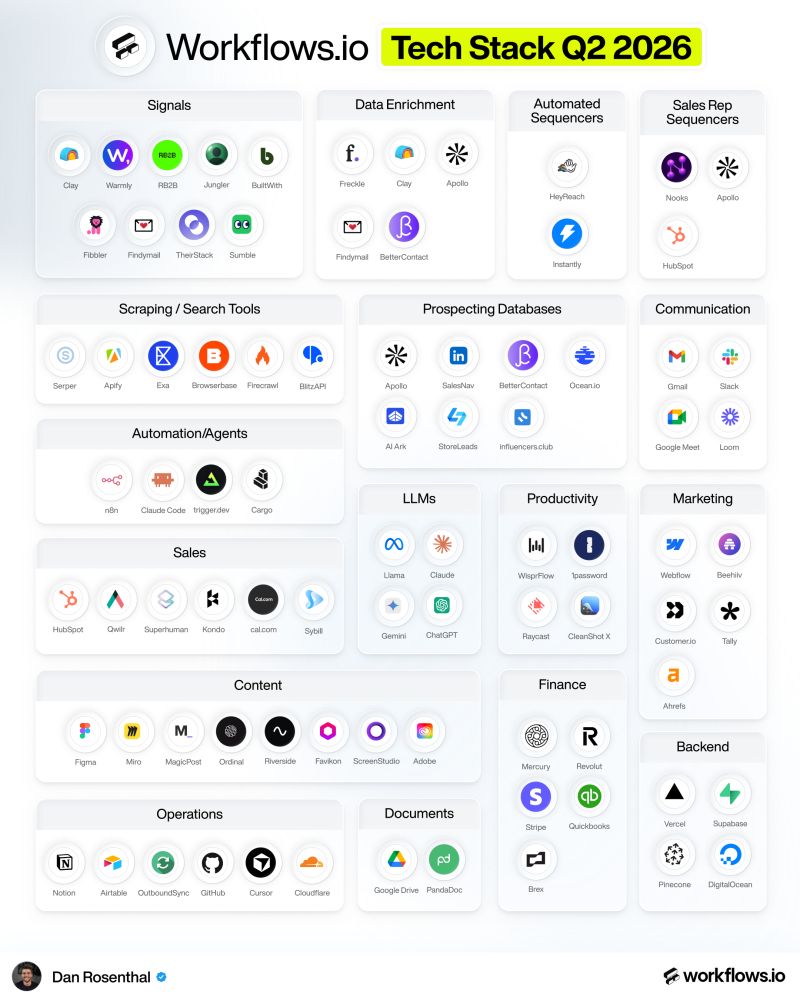
The 17 categories of our 2026 GTM tool stack
Signals
Tools that surface buying intent before a prospect raises their hand.
- Clay covers most third-party signals through its waterfall enrichments and integrations
- Warmly runs the website visitor waterfall to identify accounts visiting your site
- RB2B deanonymizes US-based website visitors at the contact level
- Jungler captures LinkedIn social signals on team and competitor posts
- BuiltWith pulls technographic data on what tools a company uses
- Fibbler tracks LinkedIn ad engagement
- Findymail has expanded into a broader signal suite beyond email enrichment
- TheirStack tracks job opening signals across companies
- Sumble surfaces additional technographic data points
Data enrichment
Tools that turn an account or contact name into a complete record.
- Freckle runs CRM enrichment in HubSpot, surfacing waterfall data inside the CRM itself
- Clay is the orchestration layer for most enrichment workflows
- Apollo provides the foundational people and company data layer
- Findymail runs the email verification waterfall before any send
- BetterContact is our newer waterfall contact provider
Automated sequencers
Tools that send outbound at scale across multiple mailboxes or LinkedIn accounts.
- HeyReach runs automated DM campaigns on LinkedIn
- Instantly runs automated cold email at scale across warmed-up domains
Sales rep sequencers
Tools where SDRs and AEs run multichannel sequences manually rather than through automation.
- Nooks is our parallel dialer for outbound calls
- Apollo doubles as a multichannel sales sequencer
- HubSpot has a sequencer built into the CRM for closer-led plays
Scraping and search
Tools that fetch data from the web in real time.
- Serper runs Google scraping for any search-based workflow
- Apify is our store of custom scrapers when standard APIs do not exist
- Exa is the AI-powered web search layer that some Claude Code skills query
- Browserbase controls a real browser remotely for scraping flows that require interaction
- Firecrawl handles web scraping and structured page extraction at scale
- BlitzAPI runs data extraction APIs across more bespoke sources
Prospecting databases
Tools we query when building target account lists from scratch.
- Apollo for fast TAL creation
- SalesNav for stakeholder mapping inside accounts
- BetterContact for additional contact data when Apollo coverage thins
- Ocean.io for lookalike list expansion off existing customers
- AI Ark is our newer contact database with strong coverage outside the US
- Store Leads for ecommerce-specific account sourcing
- influencers.club for influencer-specific outreach lists
Communication
Tools we use for team and client comms.
- Gmail and Google Meet for team and client communication
- Slack for team chat and live client support channels
- Loom for async video explainers and SOP walkthroughs
Automation and agents
The infrastructure layer that runs scheduled workflows and AI agents.
- n8n handles automation across most non-AI use cases plus simple agent workflows
- Claude Code is our most-used interface for AI agents and skills
- Trigger.dev runs background jobs and scheduling
- Cargo powers GTM agents and workflow templates we deploy for clients
For the AI agent layer specifically, see build an outbound AI agent in 60 minutes with Claude Code and the Claude Code skill library breakdown.
LLMs
The model layer underneath every AI workflow.
- Llama for open-source workflows where we need self-hosted models
- Claude for most AI tasks across writing, research, and orchestration
- Gemini for image generation
- ChatGPT powers Claygent runs inside Clay
Productivity
Tools that compound across the team's daily work.
- Wispr Flow for speech-to-text dictation across writing and prompts
- 1Password for credential management across team and clients
- Raycast for Mac shortcuts and quick actions
- CleanShot X for screenshots, annotations, and screen recordings
Sales
Tools the sales motion runs on directly.
- HubSpot is our CRM and the system of action for outbound and inbound
- Qwilr for sales proposals and decks
- Superhuman for inbox management
- Kondo is the Superhuman equivalent for LinkedIn DMs
- Cal.com for meeting scheduling
- Sybill for AI meeting recording and post-call summaries
Marketing
Tools that ship the inbound side of GTM.
- Webflow for website hosting and design system
- beehiiv for the GTM newsletter
- Customer.io for marketing automation and lifecycle email
- Tally for forms
- Ahrefs for SEO research
Content
Tools that produce and ship LinkedIn, video, and other content.
- Figma is the all-in-one design surface
- Miro for workflow mapping and process diagrams
- MagicPost for AI-assisted post drafting
- Ordinal for content scheduling and analytics
- Riverside for podcast and interview recording
- Favikon for creator and influencer research
- Screen Studio for screen recordings
- Adobe suite for video production
Finance
Tools that handle banking, payments, and accounting.
- Mercury for general banking
- Revolut for international transfers
- Stripe for payment processing
- Quickbooks for accounting
- Brex for company purchasing cards
Operations
Tools that run the day-to-day operating system of the agency.
- Notion is the company knowledge hub and project management surface
- Airtable is the database backend for most automations
- OutboundSync handles outbound CRM integrations
- GitHub stores the Company OS and client repos
- Cursor is where we host most Claude Code sessions
- Cloudflare for domain and DNS management
Documents
Tools that hold contracts, templates, and client documentation.
- Google Drive for templates and client docs
- PandaDoc for contracts
Backend
Infrastructure tools that host apps and databases.
- Vercel for hosting custom apps and dashboards we build for clients
- Supabase is our automation backend and database
- Pinecone is the vector database for the RAG-powered skills
- DigitalOcean for self-hosted services
How AI changed our 2026 GTM tool stack
A few patterns shifted in the 2026 stack compared to 2024.
The Claygent layer used to be its own category. It moved into Claude Code skills, which now do a lot of what Claygent prompts handled inside Clay.
Standalone copywriting tools used to sit in our content stack. They moved into the LinkedIn post writer skill and the outbound copywriter skill in our Company OS Starter Kit on GitHub.
Manual research tools shrank because Claude Code can now run most one-off research through web scraping MCPs like Firecrawl and Serper.
What grew was the agent infrastructure layer. n8n and Trigger.dev became central as we moved more workflows into terminal-driven execution, with Cursor as the host for most sessions.
For the full thesis on this transition, see the service-as-a-software playbook.
Where we cut tools that did not make the stack
A list this long looks comprehensive. The cuts matter as much as the inclusions.
We cut:
- Tools that overlapped with what Clay or Apollo already cover
- Tools with no MCP support and no API, because we cannot orchestrate them through Claude Code
- Tools that promised AI but produced output indistinguishable from a generic GPT-4 response
- Tools we used heavily in 2024 but stopped opening in 2025 once Claude Code skills replaced the workflow
The cuts free up budget and team attention for the tools that actually compound. A 30-tool stack used well outperforms a 60-tool stack used at 30 percent.
Conclusion
Buying 78 tools does not make you AI-native.
The tools sit on top of an operating layer that includes the Company OS, the skill library, the MCP connections, and the team that wires them together.
None of the tools matter without that operating layer underneath. A $20,000 monthly tool spend with no operating layer compounds nothing.
If you want help building the same operating layer for your team, book a strategy call. We can walk through your current stack, identify the cuts, and map the additions to your motion.